
The Weather Channel - Radar review
 Analysis by GetAllApps
When rain is in the forecast, the useful question is rarely just whether it will rain. I want to know whether a shower is moving toward my route, whether I can wait before leaving, and whether conditions might turn serious. The Weather Channel’s radar-centered experience is built around that practical problem. I find its strongest appeal in combining a visual view of approaching weather with alerts, so I can make a decision rather than simply read a forecast.
Radar that helps answer “when should I go?”
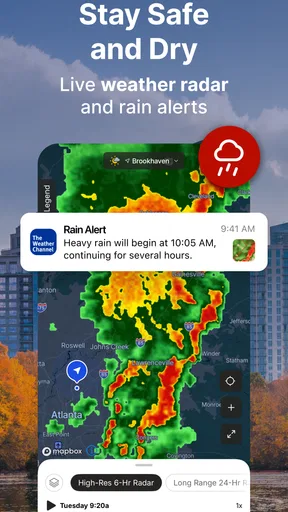
The Weather Channel is a free weather app from The Weather Channel, with a focus here on radar, future weather views, and notifications for changing or severe conditions. Instead of treating a forecast as a single daily label, its radar tools let me look at weather as something moving across a map. That shift is valuable: “rain later” is vague, while seeing a band of showers nearby gives me a reason to reconsider a walk or an errand.
The app has a 4.6 average from around 3.6 million ratings, and it has been installed over 100 million times. Those figures suggest that it has become a familiar choice for checking the weather, but popularity alone does not make radar useful. What matters in day-to-day use is whether the map and alerts help me act without forcing me to interpret every detail like a forecaster.
For a quick check, I would use the main forecast to get the broad picture, then turn to radar when timing matters. That makes the app more helpful than a basic weather screen that tells me only the expected conditions at my location. The radar view is not a replacement for judgment, though: a moving patch on a map can help me plan, but it does not guarantee exactly what will happen on my street.
Reading the map as a planning tool
Radar earns its place when I use it to compare the sky right now with the next part of my day. Before leaving, I can check whether precipitation appears to be approaching or moving away, then decide whether to go immediately, take a coat, or postpone an outdoor plan. Future radar is particularly relevant here because it encourages a short-term look ahead rather than making me rely solely on a general daily forecast.
A useful habit is to check the map twice when the weather looks unsettled: once before making a plan and again shortly before setting out. The first check gives me a rough sense of the pattern; the second helps me avoid acting on an old snapshot. This is a practical workflow, not a promise that every brief shower will be timed perfectly. Local weather can change quickly, and the closer the decision is to a narrow window, the more sensible it is to treat the map as guidance rather than certainty.
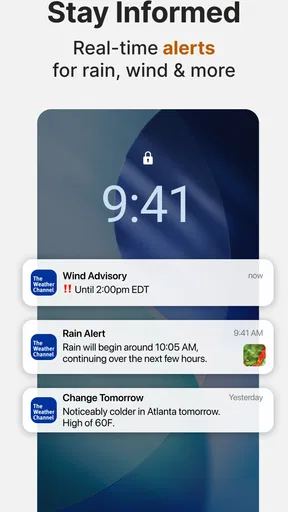
I also like the way alerts complement the visual side. A map asks me to look; a notification can bring an important change to my attention when I am doing something else. That distinction matters on a busy day. If I am concentrating on work, cooking, or travelling, I may not remember to reopen a forecast. An alert can prompt me to check conditions before a plan becomes inconvenient or unsafe.
That does not mean I would enable every notification without thought. Too many routine prompts can become background noise, which makes the important ones easier to ignore. I would keep alerts focused on the situations I genuinely care about, especially severe-weather notices, and use the app itself for ordinary checks. This balance helps preserve the value of an alert: it should interrupt me because something matters, not merely because the app has something to say.
A realistic rainy-day decision
Imagine I am planning to walk to a shop after work and the sky looks uncertain. A plain forecast might tell me that showers are possible, but that does not answer whether I should leave now or wait. I can open the radar, look at the nearby precipitation pattern, and use the future view to judge whether the weather appears likely to affect the time I have in mind. If an alert arrives while I am still at home, I have another reason to reassess before stepping outside.
The practical benefit is not that the app makes the decision for me. It gives me a better basis for choosing between leaving promptly, taking rain gear, changing the route, or delaying the errand. If I am meeting someone outdoors, that can also help me send a useful update rather than a vague “the weather might be bad.” For a short trip, even a rough sense of timing can be more useful than a long list of forecast details.
For a more serious day, such as a planned drive during unsettled conditions, I would use the radar as one part of preparation, not as the sole source of reassurance. I would check for alerts, review the forecast, and keep watching for changes before setting off. A map can make a weather pattern easier to understand, but it cannot remove the need to adapt if conditions worsen.
Where the experience has limits
Radar is most satisfying when the question is immediate and visual. It is less decisive when I want a guaranteed answer about the exact minute rain will start at one particular address. A map represents a broader area, and real conditions can differ across a short distance. If I am making a high-stakes decision, I would not treat a clear-looking patch as a promise that travel or outdoor activity will be trouble-free.
There is also a small learning curve in interpreting movement. Someone who opens a radar map for the first time may see colored areas but not immediately know how much weight to give them. I find it helps to look for the direction and overall shape of a weather system rather than obsess over a tiny spot on the map. That keeps the tool focused on planning and avoids false confidence from trying to extract more precision than a visual forecast can reasonably provide.
The app is free to download, with optional in-app purchases ranging from $0.99 to $29.99 per item. That makes it accessible for a casual trial, but anyone who prefers a completely uncomplicated, no-upsell experience may find the presence of purchase options less appealing. I would start with the free experience and decide whether it covers my routine needs before spending anything. The app is rated for Everyone, and its current version is 16.26.0 for devices running Android 9 or later.
Compared with a very simple built-in weather app, The Weather Channel gives radar and alerts a more central role, which is useful when I need to judge timing or monitor a developing situation. Compared with other dedicated weather apps, the best choice depends on what I want to do: someone who only checks the temperature before dressing may be better served by a simpler screen. Someone who wants a map, a future-looking view, and notification support in one familiar weather app has a clearer reason to choose this one.
Who gets the most from it
I would recommend it most to people whose plans are affected by changing conditions: commuters who walk part of the way, parents arranging outdoor activities, dog owners, and anyone who wants to judge whether a shower may interrupt an errand. It is also a sensible option for people who appreciate seeing a weather pattern instead of relying only on a short written summary. The combination of radar and alerts is most useful when I remember to check before plans and then let relevant notifications flag important changes.
It is not the right fit for everyone. If I rarely need more than a quick temperature check, a simpler forecast app may feel faster and less busy. If I need highly specialized local weather analysis, I would look for a service designed around that specific need rather than expect a mainstream weather app to cover every advanced use. And if notifications tend to distract me, I would keep them limited and open the radar only when the decision warrants it.
My overall view is that The Weather Channel works best as a practical planning aid, not as an authority that removes uncertainty. Its radar helps me think in terms of movement and timing, while alerts can bring important changes to my attention. The strongest routine is simple: check the broader forecast, use the map when timing matters, and treat alerts as prompts to reassess rather than guarantees. For anyone who often asks, “Can I get there before the rain?” that is a useful reason to keep it installed.
Pros and cons
Pros
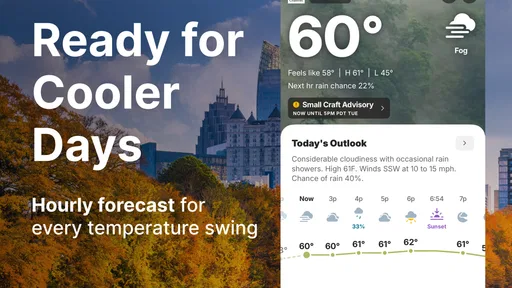
- Hourly forecasts help you plan around changing conditions.
- Radar maps make approaching storms easier to track.
- Severe weather alerts can provide useful advance notice.
- Widgets show current conditions without opening the app.
- Forecasts cover locations around the world.
Cons
- Some features require a paid subscription.
- Ads can make the interface feel cluttered.
- Radar updates may lag during rapidly changing storms.
- Location access is needed for automatic local forecasts.
- Detailed forecasts can use significant mobile data.


